Clips
Clips
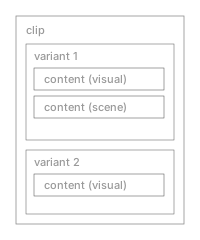
A clip is the thing you trigger during a performance. It lives on a layer and contains one or more variants. When you press a pad or click a cell in the grid, you’re launching a clip.
Each clip can have its own trigger style (toggle, oneshot) and timing behavior.
Variants
A variant is a specific configuration of content inside a clip. Each variant holds one or more content items with parameter overrides.
Variants let you have multiple looks within the same clip. Switch between them to change the visual without changing which clip is active.
Content
Content is the actual visual material: a shader, a 3D scene, a particle system, or a post-processing effect. Each content item references a content definition and can override any of its parameters.
Content types:
- visual: GLSL template shaders rendered on geometry
- shader: standalone fragment shaders (fullscreen or on mesh)
- particles: GPU particle systems
- postprocess: post-processing effects (bloom, SSAO, fog, etc.)
- actor: procedural 3D actors written in JavaScript
A single variant can combine multiple content items. For example, a shader applied to an actor’s geometry, with a post-processing effect on top.