Compositions

Hierarchy

A composition organizes all the visual content for a performance into a nested structure.
Composition hierarchy: Composition contains Tracks, which contain Layers, which contain Clips, which contain Variants, which contain Content

Composition

The top-level container for a performance. It holds all tracks, composition-level content (palette, post-processing, scenes), and saved patches. Think of it as a project file.

Tracks

Tracks group related layers together. Each track has a fader that controls the overall intensity of everything inside it. Think of tracks as channels on a mixer. A track called “Cubes” might hold all the visual layers that render cube geometry.

Layers

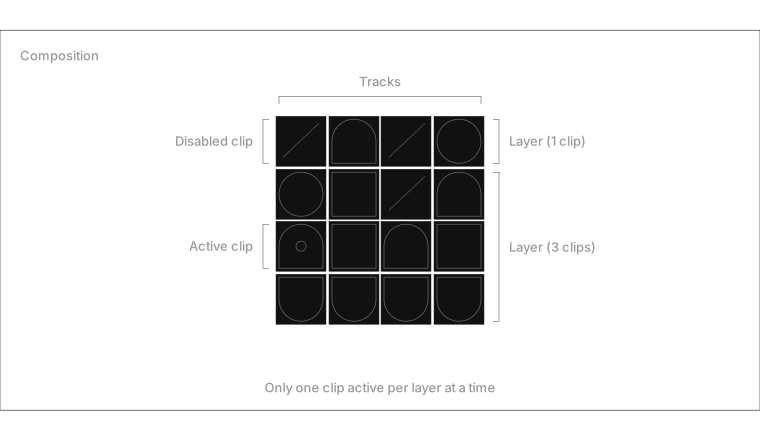
A layer sits inside a track and holds a set of clips. Only one clip can be active per layer at a time. Multiple layers across different tracks play simultaneously, compositing their visuals together.

This constraint is key to how Fantasynth works: triggering a new clip on a layer automatically replaces the one that was playing.

Clips

A clip is the thing you trigger during a performance. It lives on a layer and contains one or more variants. When you press a pad or click a cell in the grid, you’re launching a clip.

Each clip can have its own trigger style (toggle, oneshot) and timing behavior.

Variants

A variant is a specific configuration of content inside a clip. Each variant holds one or more content items with parameter overrides.

Variants let you have multiple looks within the same clip. Switch between them to change the visual without changing which clip is active.

Content

Content is the actual visual material: a shader, a 3D scene, a particle system, or a post-processing effect. Each content item references a content definition and can override any of its parameters.

Content types:

  • visual: GLSL template shaders rendered on geometry
  • shader: standalone fragment shaders (fullscreen or on mesh)
  • particles: GPU particle systems
  • postprocess: post-processing effects (bloom, SSAO, fog, etc.)
  • scene: procedural 3D scenes written in JavaScript

A single variant can combine multiple content items. For example, a shader applied to a scene’s geometry, with a post-processing effect on top.