Remote Control
Remotes
Any device with a browser can become a Fantasynth remote. A phone, a tablet, a second computer, a friend’s device. Anything that can open a web page. Your computer runs the visuals. The remotes play them.
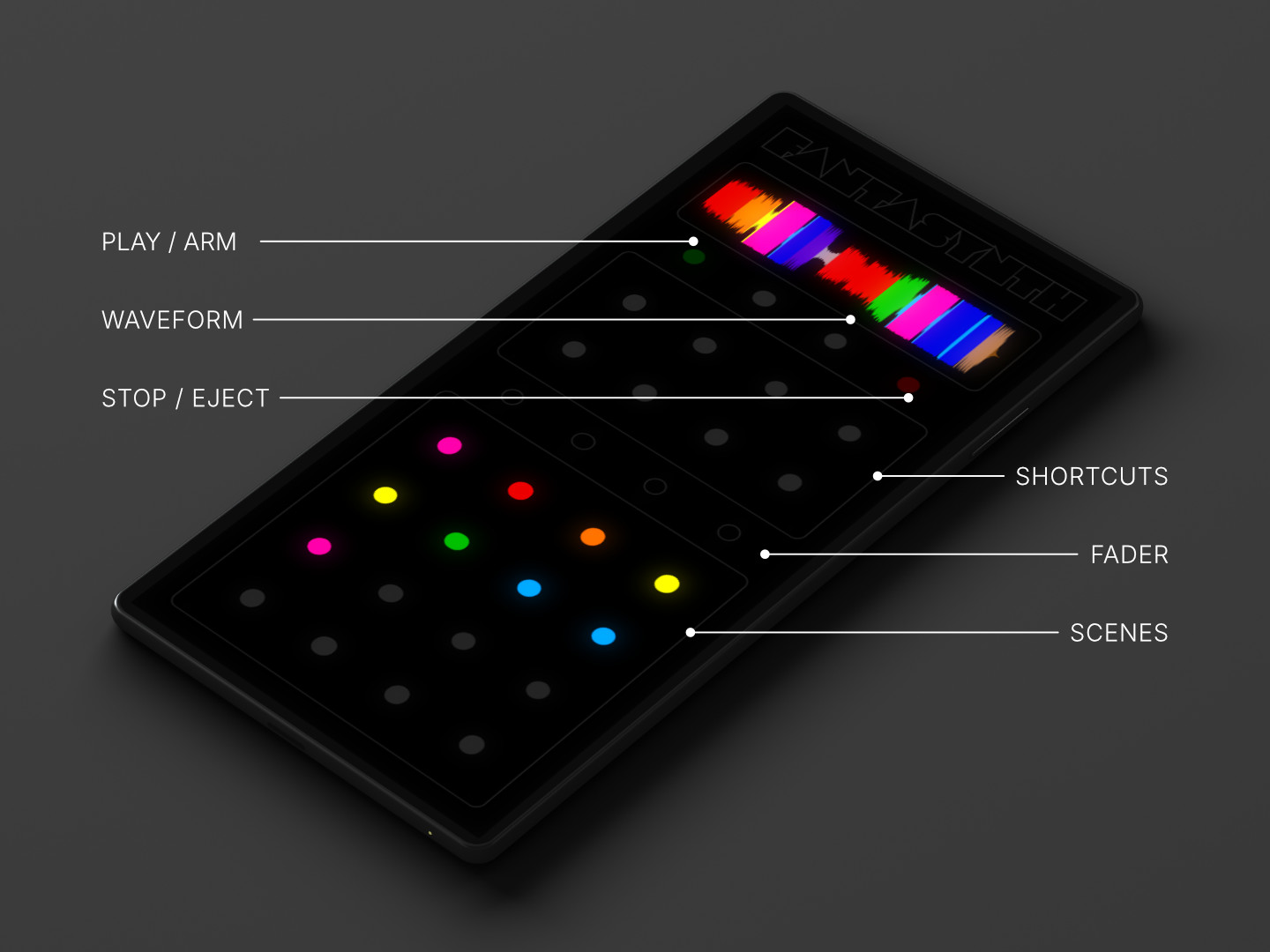
Remotes come in different shapes. Each one is its own way of playing, sized to its own purpose. Operator (above) is built for thumb reach on a phone or tablet. Others give you the full desktop layout, a wall of scene launchers, and more. New remote types are added over time.
No app to install. Remotes are web pages, served by the same Fantasynth instance running on your computer.
Connect a device
Every remote follows the same QR code flow.
- In Fantasynth, click the Remote button in the toolbar (next to Settings).
- Point your phone camera at the QR code for the remote you want to use. Tap the QR on screen to enlarge it if it is hard to scan from across the room.
- Open the link your camera shows. The remote loads and connects on its own.
The QR code includes a short room code that identifies your session, so the device finds your computer no matter which network it is on. You do not need to be on the same WiFi.
You can also copy the URL from the Remote panel and send it to someone over chat. The link includes the room code, so opening it on their device skips the manual step.
Operator
The first remote, built for live performance from a phone or tablet. It gives you, in one view, the parts of Fantasynth you reach for most live.
- 16 scene launchers. A 4x4 grid that recalls full looks. One tap, the whole composition changes.
- 8 clip shortcuts. A second block of buttons for clips you have marked as shortcuts in the composition. Use them for moments you want under your finger.
- Transport. Play and arm on one side, stop and eject on the other. Press play to start; press it again while a session is armed to lock in.
- Waveform strip. A vertical strip down the side that shows the current track, with the playhead moving as the music plays. In landscape it sits along the top.
- Shared fader. Drag along the row of dots between the shortcuts and the scenes to fade the most recently launched scene or clip in and out. Lets you ride the mix with one finger.
Everything is sized to thumb reach. The grid stays the same in portrait or landscape, so you can hold the device however feels right.
Other remotes
Two more remote types ship alongside Operator. Both use the same QR code flow.
- Full Controller. A mirror of the desktop Fantasynth interface, sized for a tablet. Clips, scenes, faders, transport, waveform, beat grid. Useful when you want everything in one place and have the screen for it.
- Scene Grid. A full-screen 4x4 of scene launchers. Nothing else. Useful when you only want to switch the look, and you want the buttons as large as possible.
More remote types are planned. Each new one will appear in the Remote panel with its own QR code as it is added.
Play together
The remote URL works for as many devices as you want to open it on. One person on transport, another on scenes, a third holding the fader. Every device sees the same live state, and every tap on one device shows up on the others. You can mix remote types in the same session: someone holds Operator on a phone while someone else watches Scene Grid on a tablet.
Useful when:
- You are at a venue and want a friend on the door to launch scenes between sets.
- You are recording with a band and someone on stage wants the shortcut block while you stay on the computer.
- You are running an installation and want a tablet on a stand instead of a keyboard.
MIDI is a separate path
Remotes run over WiFi and work alongside a MIDI controller. Plug in a controller and the remotes keep working at the same time. Both feed the same instrument; the visuals do not care which one moved a fader. See the MIDI guide for setup.
A note on connection
The room code is the only thing a remote needs to find your computer. The QR code carries it in the URL, so a fresh device never has to type anything. If a scan fails, you can read the code off the screen and enter it on the remote page by hand.
The link travels through Fantasynth’s signalling relay to introduce the two devices, then the live data flows peer to peer. Same network or different networks both work.
If a remote will not connect, the usual cause is a network that blocks peer-to-peer traffic. Some guest WiFi and corporate networks do this. Switching the device to its cellular connection is the fastest way to test that.